Can you walk me through the setup?
Absolutely! Let's get started with setting up your devices to use our web service. Follow these steps...
I have a WiFi device (heat pump, heater, boiler, etc.)
I have set up  Google Home on my phone.
Google Home on my phone. I have an eWeLink smart device that works with the  eWeLink app
eWeLink appI have linked my eWeLink device to the eWeLink app and linked eWeLink app to my Google Home account.
I have linked my WiFi device (heat pump, heater, boiler, etc.) app to my Google Home account.
I'm using eWeLink and I have an eWeLink API service [link]. (~ 9 EUR/year: need to purchase their Advanced Plan in your eWeLink phone app).
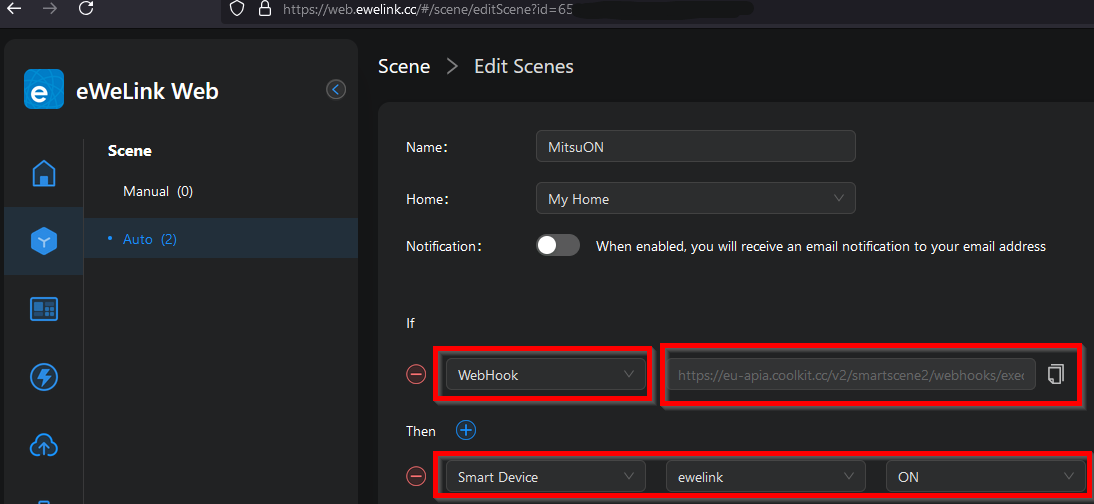
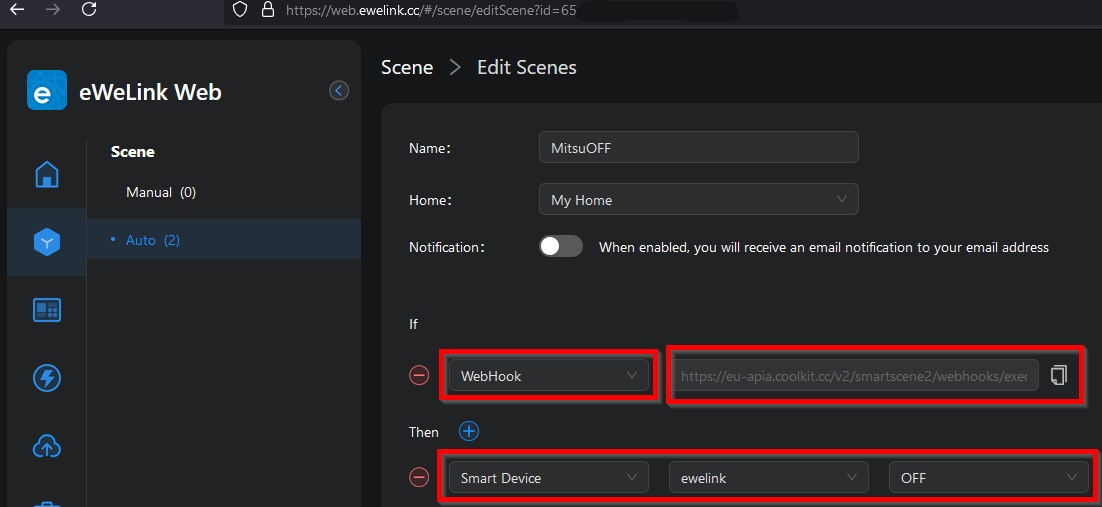
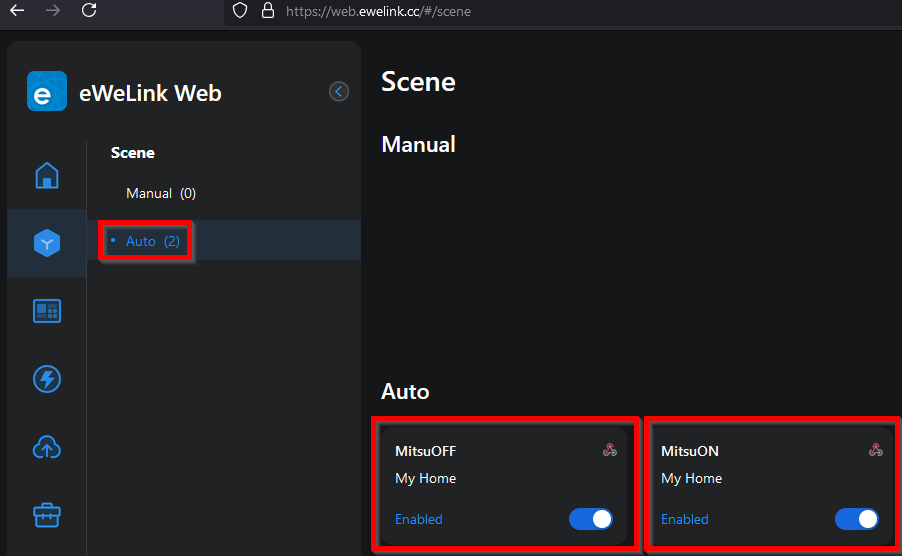
eWeLink phone app).I have created "power-on" and "power-off" webhooks in the eWeLink API service.  / /
/ /
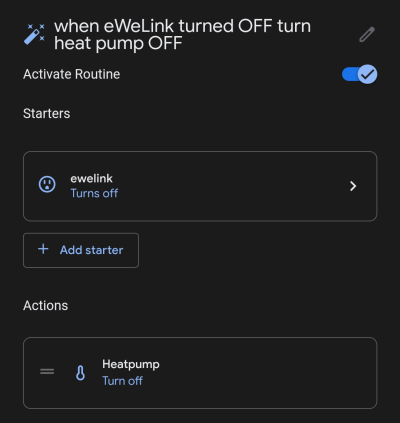
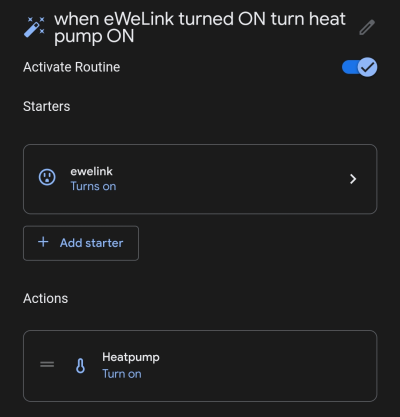
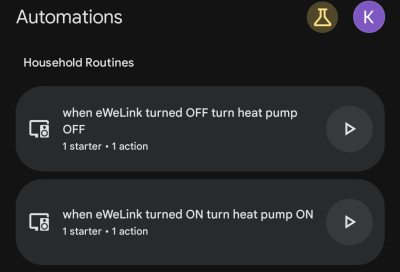
/ / I have created two "Automations" in Google Home on my phone: one turns ON my device when the eWeLink device is turned ON, and the other turns OFF my device when the eWeLink device is turned OFF.
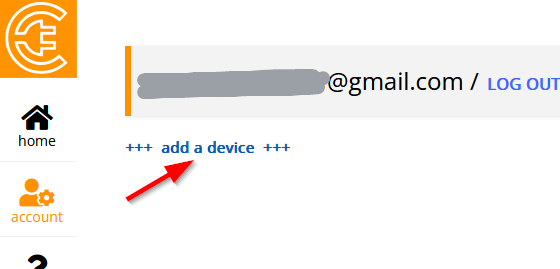
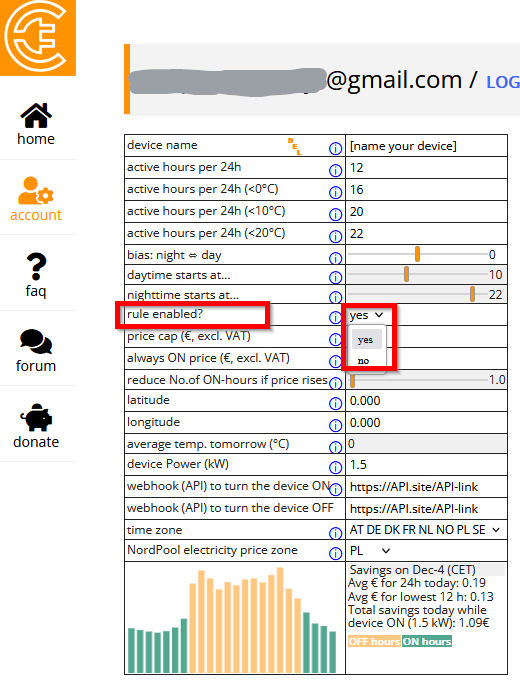
Please proceed to your Account page on our site, add a "device" , enable it , and choose the desired settings for your ON/OFF schedule.
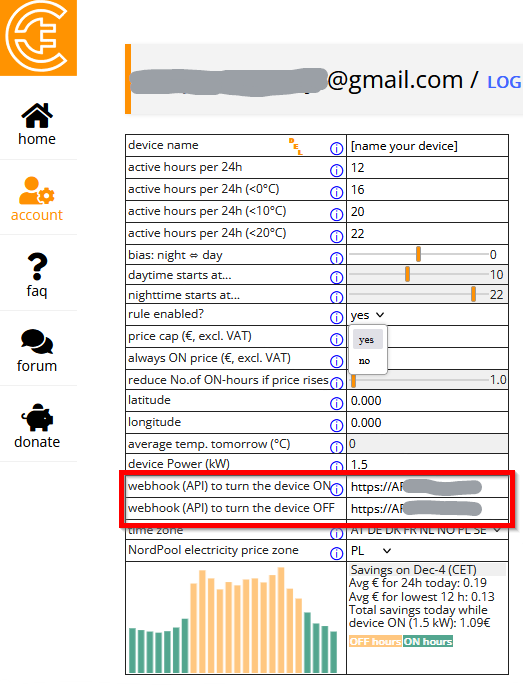
In the respective fields, enter the webhooks you got when you created the "power-on" and "power-off" commands on the eWeLink API service website
, enable it , and choose the desired settings for your ON/OFF schedule.In the respective fields, enter the webhooks you got when you created the "power-on" and "power-off" commands on the eWeLink API service website
I do NOT have an eWeLink smart device yet.
You may purchase an eWeLink power switch (~ 5--12 EUR) that better suits your needs on eWeLink device store: [here] or [here]. You may find it even cheaper on Temu or AliExpress. Look for these logos in product descriptions: or  . You will also need a subscription to the eWeLink API service (~ 9 EUR/year).
or . You will also need a subscription to the eWeLink API service (~ 9 EUR/year).
I tried to link my device to the manufacturer's app, but did not succeed. I need help.
You may ask for help in our forum. If you do not succeed, there is a workaround—please click on the correct option below:
My device is infrared controllable.
Please follow the instructions in "I have a non-WiFi device (heat pump, heater, boiler, etc.) with infrared remote control". (See under "Can you walk me through the setup?")
My device is not infrared controllable.
You can view your device as a hard power-off device and follow the instructions in "I have a "hard power-on/off" device". (See under "Can you walk me through the setup?")
My device does not have a manufacturer's app.
My device is infrared controllable.
Please follow the instructions in "I have a non-WiFi device (heat pump, heater, boiler, etc.) with infrared remote control". (See under "Can you walk me through the setup?")
My device is not infrared controllable.
You can view your device as a hard power-off device and follow the instructions in "I have a "hard power-on/off" device". (See under "Can you walk me through the setup?")
My device has a manufacturer's app, but I need help linking my device to the manufacturer's app.
You may ask for help in our forum. But before that, please check if your manufacturer's app can be added as a service to Google Home—otherwise, all your efforts would be in vain. Here is the list of apps/services which can be linked to Google Home: . Some WiFi-enabled devices with manufacturer's apps (like Mill Norway) cannot be added to Google Home.
My device has a manufacturer's app, but it does not work with (or cannot be added to) Google Home.
My device is infrared controllable.
Please follow the instructions in "I have a non-WiFi device (heat pump, heater, boiler, etc.) with infrared remote control". (See under "Can you walk me through the setup?")
My device is NOT infrared controllable.
You can view your device as a hard power-off device and follow the instructions in "I have a "hard power-on/off" device". (See under "Can you walk me through the setup?")
My WiFi-enabled device is too old and does not have a manufacturer's app.
No problem! There is still a way to control your device:
My device came with an infrared remote control and I use IR remote to turn it ON/OFF.
Please follow the instructions in "I have a non-WiFi device (heat pump, heater, boiler, etc.) with infrared remote control". (See under "Can you walk me through the setup?")
My device is NOT infrared controllable.
You can view your device as a hard power-off device and follow the instructions in "I have a "hard power-on/off" device". (See under "Can you walk me through the setup?")
I have a non-WiFi device (heat pump, heater, boiler, etc.) with infrared remote control.
I have added the manufacturer's app/service to my Google Home account on my phone.
Google Home account on my phone. I have an eWeLink smart device that works with the eWeLink app.
eWeLink app.I have linked my eWeLink device to the eWeLink app and linked eWeLink app to my Google Home account.
I'm using eWeLink and I have an eWeLink API service [link]. (~ 9 EUR/year: need to purchase their Advanced Plan in your eWeLink phone app).
eWeLink phone app).I have created "power-on" and "power-off" webhooks in the eWeLink API service. / /
/ / I have created two "Automations" in Google Home on my phone: one turns ON my device when the eWeLink device is turned ON, and the other turns OFF my device when the eWeLink device is turned OFF.
Please proceed to your Account page on our site, add a "device" , enable it , and choose the desired settings for your ON/OFF schedule.
In the respective fields, enter the webhooks you got when you created the "power-on" and "power-off" commands on the eWeLink API service website
, enable it , and choose the desired settings for your ON/OFF schedule.In the respective fields, enter the webhooks you got when you created the "power-on" and "power-off" commands on the eWeLink API service website
I do NOT have an eWeLink smart device yet.
You may purchase an eWeLink power switch (~ 5--12 EUR) that better suits your needs on eWeLink device store: [here] or [here]. You may find it even cheaper on Temu or AliExpress. Look for these logos in product descriptions: or . You will also need a subscription to the eWeLink API service (~ 9 EUR/year).
or . You will also need a subscription to the eWeLink API service (~ 9 EUR/year).
I have a "hard power-on/off" device
I have an eWeLink smart device that works with the eWeLink app. ...OR... a Shelly smart device:  (shipping from Europe).
eWeLink app. ...OR... a Shelly smart device: (shipping from Europe).I have linked my eWeLink (or Shelly) device to the eWeLink (or Shelly) app.
I'm using eWeLink (not Shelly) and I have an eWeLink API service [link] (~ 9 EUR/year: need to purchase their Advanced Plan in your eWeLink phone app).
!!! No need to purchase an API subscription if you are using a Shelly device.
eWeLink phone app).!!! No need to purchase an API subscription if you are using a Shelly device.
I have created "power-on" and "power-off" webhooks in the eWeLink API service. / / ...OR... set up the Shelly smart switch. (Follow the steps outlined [here])
/ / ...OR... set up the Shelly smart switch. (Follow the steps outlined [here])
Please proceed to your Account page on our site, add a "device" , enable it , and choose the desired settings for your ON/OFF schedule.
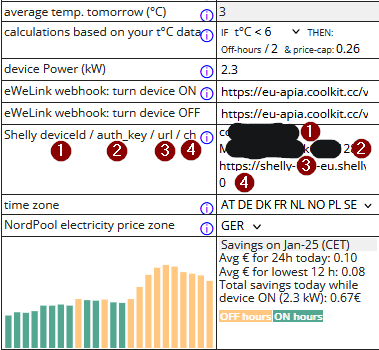
In the respective fields, enter the webhooks you got when you created the "power-on" and "power-off" commands on the eWeLink API service website ...OR... the required details for your Shelly device
, enable it , and choose the desired settings for your ON/OFF schedule.In the respective fields, enter the webhooks you got when you created the "power-on" and "power-off" commands on the eWeLink API service website
...OR... the required details for your Shelly device
I do NOT have an eWeLink (or Shelly) smart device yet.
You may purchase an eWeLink power switch (~ 5--12 EUR) that better suits your needs on eWeLink device store: [here] or [here]. You may find it even cheaper on Temu or AliExpress. Look for these logos in product descriptions: or . You will also need a subscription to the eWeLink API service (~ 9 EUR/year).
...OR...
You may purchase a Shelly power switch (~ 15--120 EUR) here:. Shelly devices are more expensive, but Shelly provides a free API service.
or . You will also need a subscription to the eWeLink API service (~ 9 EUR/year)....OR...
You may purchase a Shelly power switch (~ 15--120 EUR) here:
. Shelly devices are more expensive, but Shelly provides a free API service.
I have an EV car
Support for EV cars is coming soon.
Who can use our service?
Our service is available exclusively to individuals and companies located in the countries within Europe's Nord Pool zone. These countries include Finland, Sweden, Norway, Denmark, Latvia, Lithuania, Estonia, France, the Netherlands, Austria, Belgium, Germany, Luxembourg, and Poland. To benefit from our service, you need to have a spot-price contract based on electricity market prices.
What devices (heaters/boilers/heat pumps/EV cars, etc.) are supported?
WiFi-enabled devices which can be linked to Google Home
To link these devices to our service, you only need an eWeLink smart switch (~ 5--12 EUR) [link] and a subscription to the eWeLink API service [link] (~ 9 EUR/year: need to purchase their Advanced Plan in your eWeLink phone app). To make sure that your device falls into this category, please check if (1) your device has WiFi, (2) you have linked your device to the respective app (e.g.,  MELCloud for Mitsubishi heat pumps), and (3) your app/service is linked to Google Home (where you will be controlling your device with the eWeLink service, which should also be linked to your Google Home). List of apps/services which can be linked to Google Home:
eWeLink phone app). To make sure that your device falls into this category, please check if (1) your device has WiFi, (2) you have linked your device to the respective app (e.g., MELCloud for Mitsubishi heat pumps), and (3) your app/service is linked to Google Home (where you will be controlling your device with the eWeLink service, which should also be linked to your Google Home). List of apps/services which can be linked to Google Home:
Devices without WiFi which cannot directly be linked to Google Home
Soft power-on/off devices (non-WiFi heat pumps, etc.)
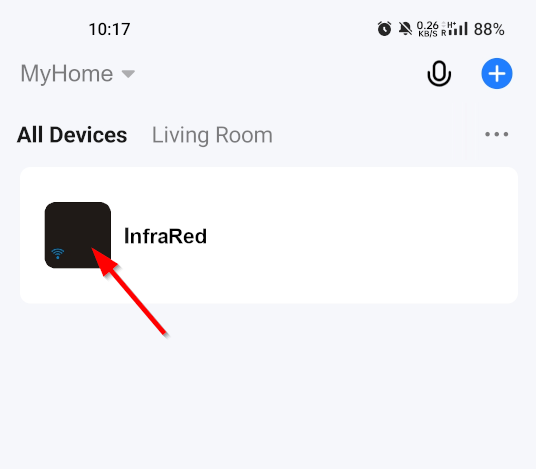
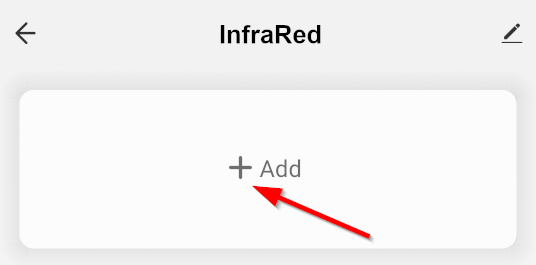
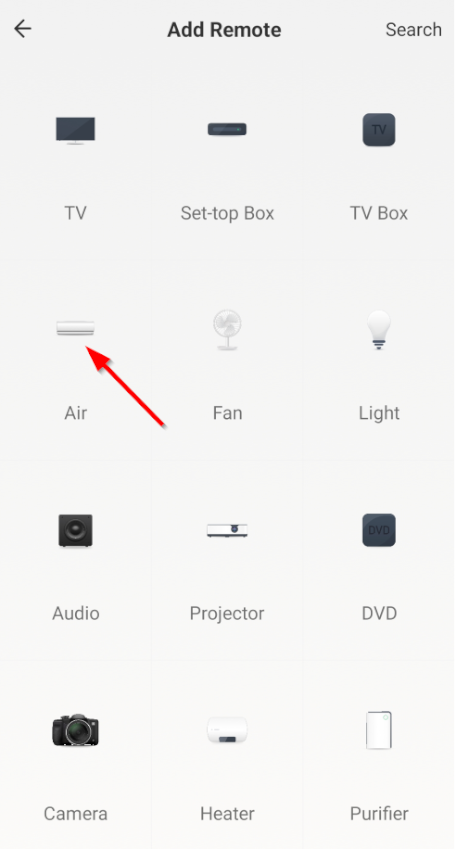
To link these devices to our service, you need an eWeLink smart device (~ 5 EUR) [link], a subscription to the eWeLink API service [link] (~ 9 EUR/year: need to purchase their Advanced Plan in your eWeLink phone app) AND a smart infrared remote (~ 5 EUR) to be controlled via our service [link].
eWeLink phone app) AND a smart infrared remote (~ 5 EUR) to be controlled via our service [link].
Hard power-off devices (heaters, etc.)
To link these devices to our service, you need to choose an eWeLink smart device (~ 5--12 EUR) [link / link] and a subscription to the eWeLink API service [link] (~ 9 EUR/year: need to purchase their Advanced Plan in your eWeLink phone app) ...OR... a smart switch (~ 15--120 EUR) [link] (+ Shelly API service, which is free).
eWeLink phone app) ...OR... a smart switch (~ 15--120 EUR) [link] (+ Shelly API service, which is free).
EV cars
[coming soon]
How to get support?
You can ask all your questions in the forum. If you have a more personal question with details you would not want to make public, you can use this forum thread. That part of the forum is private—only the poster (YOU) and the admin can see the posts. (You can verify that by logging out and then trying to view that same forum thread. You will find it empty.)
You will find more info in our forum.
How do you make money?
We are not affiliated with the products/services listed on our website that may be needed to use our web service. Our services are donation-based.
Are there any limitations to your free service?
We offer ONLY free service.
Does it matter what electricity contract and provider I use?
With powerbill.eu, you can save on your electricity bills, regardless of your electricity provider (aWATTar, Electrum, Enefit, Fortum, Helen, etc), as long as you have a spot-price contract based on electricity market prices.


List of Services Which Work with Google Home (updated 2024-12-01)
##Phoebe Smart 1
...
...
...
...
List of Services Which Work with Google Home (updated 2024-12-01)
##Phoebe Smart 2
...
...
...
...